LISA ARMSTRONG
IT 810 MULTIMEDIA DESIGN
EMPORIA STATE UNIVERSITY
Welcome to my IT 810 Project 1 - Image and Sound Editing page. For this week's assignment, I will be editing two separate images using Adobe Photoshop and Adobe Fireworks. Then, for the second part of Project 1, I will create a single sound file from multiple sound clips using Audacity. Enjoy!

IMAGE EDITING
IMAGE #1
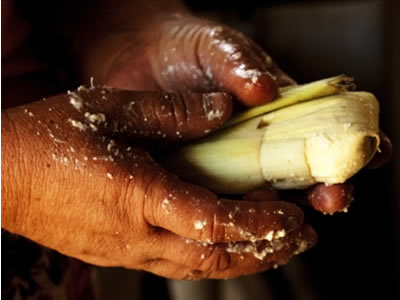

I took this photograph in a woman's home in the mountains of Honduras while I was a medical missionary there. She is making "ticucos," a traditional Honduran tamale usually made from fresh corn during the harvest season. The lighting was poor in the kitchen, but I loved the details of this picture so much that I decided to try to work with the photograph. This is something I might create for our mission's website or perhaps a newsletter.
In Adobe photoshop, I used the following steps to correct color balance and bring out the details of the hands and ticuco: 1) changed the color balance to Cyan -48, Magenta -16, Yellow +10 2) changed the exposure -0.82, Gamma Correction 1.15 3) adjusted the focal length. Then, for the purpose of using the image on a webpage, I imported the jpg image I created in Photoshop into Adobe Fireworks. Using the eyedropper to identify the darker colors in the background of the image, I used the brush tool (airbrush basic, edge 100) to darken the areas around the hands and ticuco. This allowed me to avoid creating a vector mask, while at the same time maintaining the focus on the details of the hands and ticuco. Then, I sharpened the image to bring out some of the finer details of the image. Once this was completed, I created a text layer using the "Gabriola" font, size 62. I created an outer glow (width 2 using a dark grey #333333 with 65% transparency and 12 softness) to illuminate the letters, helping them to stand out from the background a bit more.
In Adobe photoshop, I used the following steps to correct color balance and bring out the details of the hands and ticuco: 1) changed the color balance to Cyan -48, Magenta -16, Yellow +10 2) changed the exposure -0.82, Gamma Correction 1.15 3) adjusted the focal length. Then, for the purpose of using the image on a webpage, I imported the jpg image I created in Photoshop into Adobe Fireworks. Using the eyedropper to identify the darker colors in the background of the image, I used the brush tool (airbrush basic, edge 100) to darken the areas around the hands and ticuco. This allowed me to avoid creating a vector mask, while at the same time maintaining the focus on the details of the hands and ticuco. Then, I sharpened the image to bring out some of the finer details of the image. Once this was completed, I created a text layer using the "Gabriola" font, size 62. I created an outer glow (width 2 using a dark grey #333333 with 65% transparency and 12 softness) to illuminate the letters, helping them to stand out from the background a bit more.
IMAGE EDITING
IMAGE #2


There is no greater joy than to see hungry children be fed! Our organization, Fellow Man International, feeds school children in villages with high incidences of malnutrition as part of our school lunch program to combat hunger. This photograph was taken during a Children's Day celebration. The kids were not about to stop eating long enough to take a picture. For this photo editing challenge, I began again with Adobe Photoshop. I was happy with the photo's exposure and clarity, so I began with the oilpaint filter under the stylize tab. I used the following settings to create the oilpaint effect: 1) stylization 1.7 2) cleanliness 7.0 3) scale 1.8 4) bristle detail 10 5) lighting -60 6) shine 10. I saved the image as a jpg to be imported into Adobe Fireworks.
I then created a white canvas in Adobe Fireworks. I imported the newly created oilpaint image into the new Fireworks file as a layer. Additionally, I imported a png file of a solid white map of Honduras against a clear background that I purchased from Shutterstock. I adjusted the size of the map to cover the children's faces, trying to include as many children in the mask as I could. Next, I highlighted both layers (the oilpaint image and the white Honduran map image). I clicked the modify tab on the top bar of Fireworks and then clicked "group as mask." This created a mask image. Finally, I used the live, drop shaddow filter,(distance setting 8) to give the illusion that the map is raised off of the canvas. I am really pleased how the green colors above and around the children as well as the blue table seem to make the Honduras map appear to have the colors of the rainforest and the ocean. Again, this is something I might use on the website, in a brochure or a newsletter.
SOUND EDITING
"WARNING" BY JENNY JOSEPH
This activity involving sound editing and the mixing of sound files using Audacity was a lot of fun! The poem "Warning" by Jenny Joseph is one of my favorites. First, I recorded myself narrating the poem using the app for Android, "Voice Recorder". It has several settings which achieve a higher audio quality than the "record" feature of Audacity. I then imported the wav file I created of that narration into the new project I was creating in Audacity. Next, I began to search for a background track which would set the mood for the poem. I have a subscription to Audioblocks.com, a source for royalty free music and sound effects, which I use frequently when programming social robot educational content.
Because the woman speaking in first person in the poem seems like a bit of a rebel to me, I chose an audio file called, "Ticked Off" in the Audioblocks library. The tone of the music is playful and matched fairly well to the cadence of my narration. It was also the same length as my narration, so I was not required to edit the length of the file, nor was it necessary to fade-in at the beginning, nor fade-out at the end of the track. I adjusted the volume of the music below the volume of the narration to ensure the music did not distract from the reading of the poem.
Finally, I searched for words within the poem to which I could coordinate "stingers" or sound effects throughout my narration. In all, I downloaded fourteen different sound effects for this recording. Each sound file had a different volume level, so I had to individually adjust the levels for each sound effect beneath the baseline volume level of the narration. Some sound effects were too long for the pauses, so I clipped small sections of the sound effects which I thought worked best given the context. I generated/added timed sections of silence to each of the sound effects so that they played in coordination with the identified key words of the poem. I applied multiple effects to the sound effect files in Audacity to ensure those effects enhanced the meaning of the main poem without becoming the focal point. They were the following: change speed, change tempo, change pitch, fade in and fade out. I hope you enjoyed the poem. As for me, you can be sure, "when I am old, I shall wear purple."
Because the woman speaking in first person in the poem seems like a bit of a rebel to me, I chose an audio file called, "Ticked Off" in the Audioblocks library. The tone of the music is playful and matched fairly well to the cadence of my narration. It was also the same length as my narration, so I was not required to edit the length of the file, nor was it necessary to fade-in at the beginning, nor fade-out at the end of the track. I adjusted the volume of the music below the volume of the narration to ensure the music did not distract from the reading of the poem.
Finally, I searched for words within the poem to which I could coordinate "stingers" or sound effects throughout my narration. In all, I downloaded fourteen different sound effects for this recording. Each sound file had a different volume level, so I had to individually adjust the levels for each sound effect beneath the baseline volume level of the narration. Some sound effects were too long for the pauses, so I clipped small sections of the sound effects which I thought worked best given the context. I generated/added timed sections of silence to each of the sound effects so that they played in coordination with the identified key words of the poem. I applied multiple effects to the sound effect files in Audacity to ensure those effects enhanced the meaning of the main poem without becoming the focal point. They were the following: change speed, change tempo, change pitch, fade in and fade out. I hope you enjoyed the poem. As for me, you can be sure, "when I am old, I shall wear purple."
©2020 - LISA ARMSTRONG